The person the geofence was never written for
DailyBrew has three ways of asking are you really here? A geofence checks the phone is at the restaurant. An IP allow-list checks it's on the restaurant's network. Device verification checks the same phone did the check-in and the check-out, and that nobody else borrowed it.
All three are written for the same person: someone who works in one building, on one network, from one phone. Most of a restaurant's staff are exactly that person.
Some aren't. The area manager who covers four sites and is never at the same one twice. The delivery driver who finishes the last drop and clocks out from the van. The owner who does the books from home on a Sunday.
Until now those people had two options, and both were bad. Turn the check off for the whole workspace — which is to say, stop checking anyone. Or leave it on and let them fail every day, then fix it by hand afterwards.
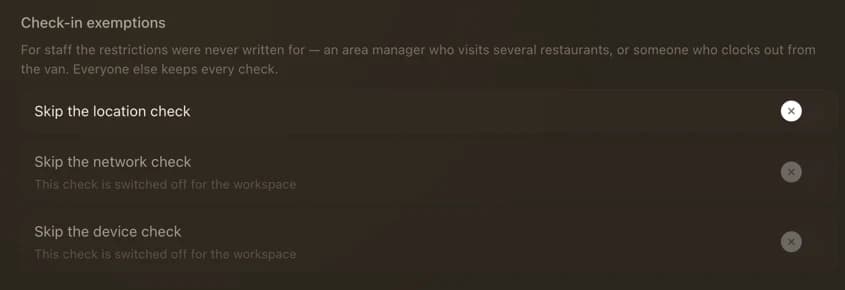
Three checks, three switches
An exemption names a person and a check. The area manager who is legitimately somewhere else is excused from the location check and nothing more: their check-in still has to come from the restaurant's network, still has to come from their own phone.
That's deliberate. The reason someone is off the geofence is almost never the same as the reason they'd be off device verification — one is about where they stand, the other about which phone is in their hand. A single "trusted staff" flag would collapse the two and hand out more than anyone meant to give.
It can only ever open a door
The rule runs one way. An exemption can switch a check off for one person; nothing about it can switch a check on. If your workspace has geofencing disabled, marking someone exempt from it changes nothing at all — there was no fence to excuse them from.
That sounds like a small thing. It's the property that makes the feature safe to reason about: the worst a mistake here can do is fail to restrict someone. It can never quietly start restricting someone you didn't mean to.
For the same reason, the toggles for checks your workspace has switched off are visible but inert, and say why. A control that would silently do nothing is worse than one that explains itself.
Owner-only, on purpose
Managers with the employee permission can do a great deal — add staff, edit them, assign shifts. They cannot set exemptions.
The reason is blunt: a manager who could exempt their own employee record from the geofence could clock in from home, and the person best placed to notice would be the person who did it. Deciding who stands outside the workspace's rules is editing the reach of a setting managers can't edit in the first place. So it sits with the owner, next to the settings it modifies.
A downgrade suspends, it doesn't erase
Exemptions are an Espresso feature, because the three restrictions they excuse people from are. On the Free plan they're simply not honoured — every check applies to everyone.
But they aren't deleted. A workspace that drops to Free and comes back later finds its configuration where it left it, rather than discovering months on that the area manager has been quietly fenced in since the downgrade.
The honest part
An exemption is a hole in a control you turned on for a reason. We'd rather say that plainly than dress it up.
What makes it defensible is that it's named. It applies to one person, to one check, set by the owner, and visible on that employee's record — rather than the alternative everyone actually reaches for, which is switching the geofence off for the whole restaurant because one person kept complaining. That version is also a hole. It's just a much bigger one, and nobody writes it down.
Where to find it
Open an employee, edit, and look under Attendance tracking. Three switches, off by default, for every employee you have. Most of them should stay that way.