The shift widget: your check-in state without opening the app
Most of what staff want from DailyBrew is one line long: am I clocked in, and since when? The log, the leave requests, the monthly grid — those can wait for a moment when someone actually has a free hand.
So we put that line where people already look. On iOS, DailyBrew now ships a Home Screen widget, a Lock Screen accessory, and a Live Activity that runs in the Dynamic Island while a shift is open.
Three places, one answer
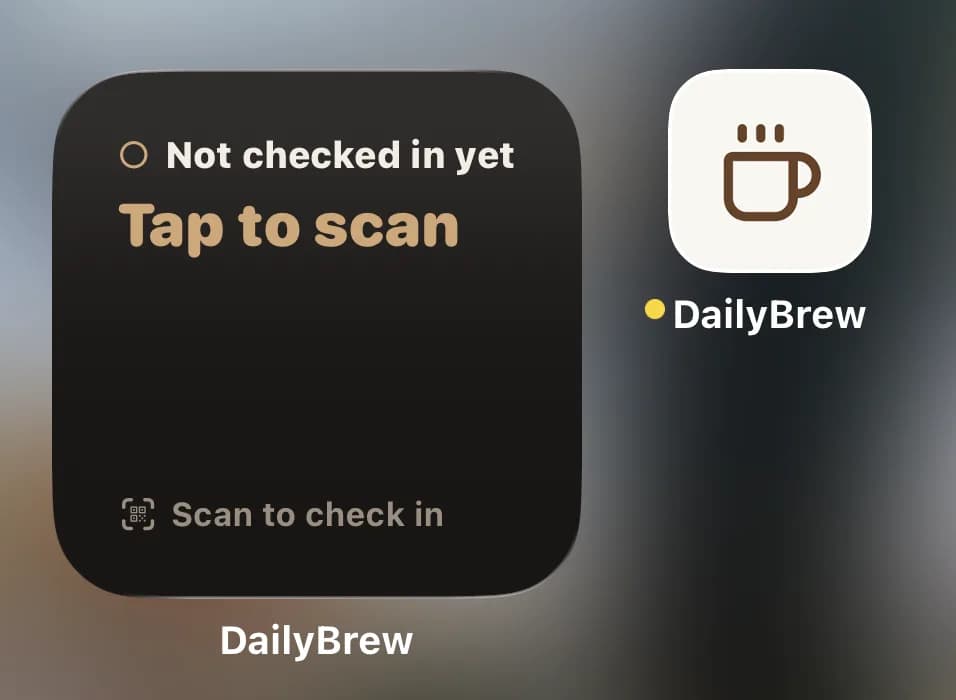
Home Screen, in small and medium. The workspace name, the status, and either the time you clocked in or what the day has come to so far.
Lock Screen, in all three accessory shapes — circular beside the clock, rectangular under it, inline next to the date. Readable without unlocking the phone.
Dynamic Island and Lock Screen banner, while you're on shift, with a timer counting up from your check-in.
All three render the same snapshot, so they can't contradict each other — and they can't contradict the app either.
Four states, and only four
Not checked in — "Tap to scan." On shift — "Checked in at 09:02," in green. Done for the day — the total worked, "7h 32m." On leave — amber, and no prompt to scan.
That vocabulary is deliberately tiny. A widget gets read in about a second, at arm's length, usually by someone carrying something in the other hand. Anything that needs a second glance belongs in the app.
The whole card is a scan button
Tap anywhere on the widget and the scanner opens — camera up, ready for the QR code on the wall.
It's the card itself, not a button drawn on it. A widget button fires a background action and deliberately doesn't bring the app forward, which is precisely the wrong behaviour for something that needs a camera. Same destination as the app-icon long-press and the Siri shortcut, so however you reach for it, you land on the scanner.
The icon does it too
You don't have to add anything to reach the scanner. Long-press the DailyBrew icon on the Home Screen and Scan to check in sits at the top of the menu, above the system items — one press, one tap, camera up.
It is the same destination as the widget, and it is there whether or not anybody has added a widget. That matters more than it sounds. A widget is something a person has to decide to install, and most people never decide to; the icon is already on the screen.
What the icon cannot do is tell you anything. A quick action is a verb — it opens the scanner, and that is the whole of it. The widget is the one that answers am I clocked in, and since when? without opening anything at all. Add the widget if you will use it; if you never get round to it, the icon is already there.
And if your restaurant has put up an NFC tag, tapping the tag skips both. The phone opens the app on the check-in itself — nothing to aim, nothing to press.
The timer ticks on its own
The Live Activity is handed the instant your shift started and then lets the system count. Nothing is pushed to it minute by minute, which is why the clock is still right after the app has been closed for hours — and why it doesn't burn through the update budget iOS allows.
When the shift ends, the activity ends. Including when the check-out happened somewhere else: the app reconciles against the activity that's actually running rather than a note it left itself, so a stranded timer from another device gets retired.
It gets the night shift right
A widget that subtracted "18:00" from "02:00" would tell a bartender they'd worked minus sixteen hours.
So the total is computed from real instants, never from the clock times shown on screen. A shift that crosses midnight adds up to eight hours, the same way the +1 marker keeps overnight check-outs readable everywhere else in DailyBrew.
What a widget can and can't know
Widgets don't fetch. iOS wakes them rarely, on its own schedule, and the network isn't theirs to use — so the app is the single writer. While DailyBrew is open it refreshes check-in state about once a minute and writes a new snapshot whenever something actually changed.
In practice: your own check-in and check-out appear at once, because you were in the app to make them. A change made elsewhere — a manager correcting your check-out, a leave request approved — lands the next time the app runs. The widget shows the last state it was handed and never guesses at a newer one.
Monochrome on the Lock Screen, on purpose
The Lock Screen renders accessory widgets in a single tint, so the green that means "on shift" on the Home Screen would simply disappear there.
Rather than fight it, the accessories carry the state in the symbol and the words: a filled clock while you're on shift, a check mark when the day is closed, a sun on a leave day, a QR frame when nothing has been recorded yet.
Adding one
Long-press the Home Screen, tap +, find DailyBrew, pick the small or medium card. For the Lock Screen: long-press it, tap Customize, tap a slot, choose DailyBrew. The Live Activity needs nothing added — it starts when you check in, as long as Live Activities are switched on for DailyBrew in Settings.
There's no plan gate and nothing to enable in the console. Any employee or manager who checks in from an iPhone has it.
iOS for now
The widget toolchain we build on has no Android support yet, so the Android app is unchanged for the moment. That's where the tooling is, not a judgement about which phone your staff carry — and the snapshot the widgets read is already platform-neutral, so there's nothing to redesign when it lands.